Tools#
All developers are welcome to use whatever tools that they would like, but they are encouraged to use some of the tools below.
Python#
We are currently working off of Python 3.7.6, but plan to support more versions in the future. We likely will not be supporting any Python 2 versions.
IDE#
Note
We understand that IDE’s are very near and dear to developers hearts, this is just a suggestion and what we are using.
We are using Visual Studio 2022 - Community for development. Below are some add-ons and configuration details that make development easier.
Visual Studio 2022 - Community
Installing & Configuring VS 2022
By following the above link you can download Visual Studio 2022. We use community edition such that we do not have to pay extra, but professional and enterprise will work as well.
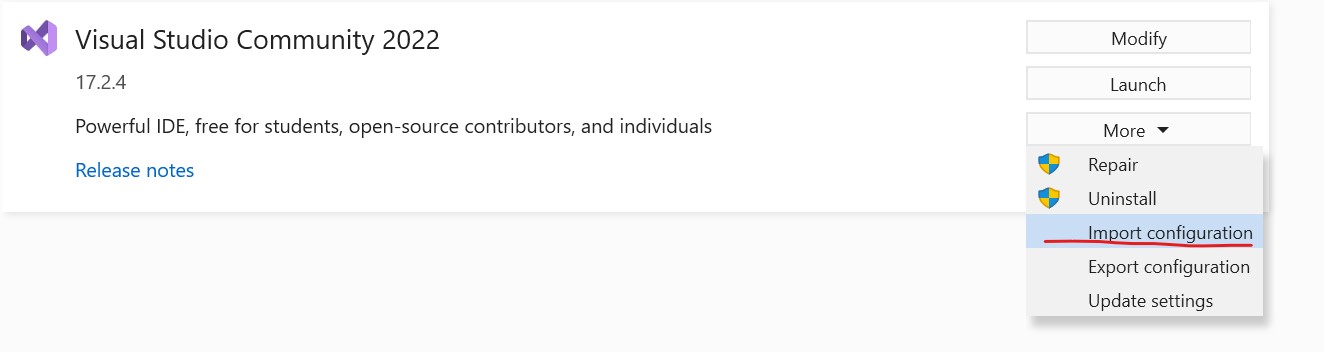
When choosing a configuration, we suggest using the attached configuration file for importing settings.
Version Control#
Git#
Git is only source control that we will be using for this project. I am using v2.36
SourceTree#
SourceTree is a free tool that I use for a lot of Git stuff. It has a super clean UI and works better than some of the IDE embedded version control systems (IMO).
Documentation:#
Figma#
For diagram generation and process flow mapping, I have recently been using Figma. It is an awesome tool and does not have a crazy pay wall limiting you from features.
Note
I recommend downloading the Desktop client, although the browswer version contains all the same features.
TODO: I need to create a shared workspace
Sphinx + ReadTheDocs#
Sphinx and ReadTheDocs are two tools that we will use a lot for strong documentation for this project.
TODO: Some more notes here would be nice
You can learn more about both below: